- 객체에 복잡한 수정이나 변형
- 적용전 수정 및 변형 결과를 미리 살펴볼 수 있음
- 오브젝트 모드에서만 사용가능
사용법
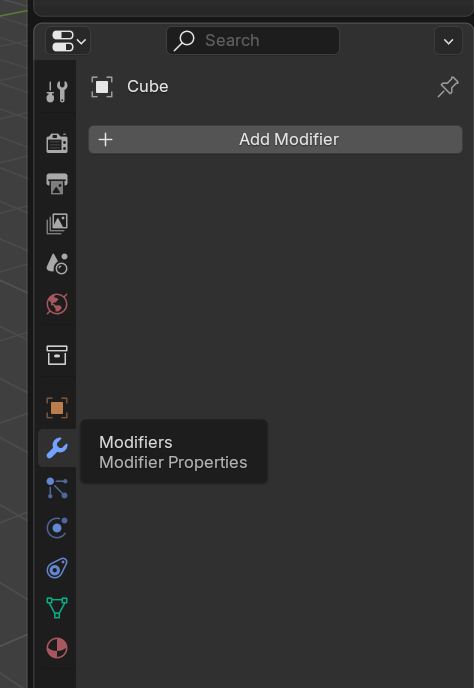
- 객체를 선택한 뒤 properties 에디터의 modifier 탭에서 “Add Modifier” 버튼으로 적용
종류
- Edit
- Data Transfer
- Mesh Cache
- Mesh Sequence Cache
- UV Project
- UV Warp
- Vertex Weight Edit
- Vertex Weight Mix
- Vertex Weight Proximity
- Generate
- Array
- Array (Legacy)
- Bevel
- Boolean
- Build
- Curve to Tube
- Decimate
- Edge Split
- Mask
- Mesh to Volume
- Mirror
- Multiresolution
- Remesh
- Scatter on Surface
- Screw
- Skin
- Solidify
- Subdivision Surface
- Triangulate
- Volume to Mesh
- Weld
- Wireframe
- Deform
- Armature
- Cast
- Curve
- Displace
- Hook
- Laplacian Deform
- Lattice
- Mesh Deform
- Shrinkwrap
- Simple Deform
- Smooth
- Smooth Corrective
- Smooth Laplacian
- Surface Deform
- Volume Displace
- Warp
- Wave
- Normals
- Normal Edit
- Weighted Normal
- Smooth By Angle
- Physics
- Cloth
- Collision
- Dynamic Paint
- Explode
- Fluid
- Ocean
- Particle Instance
- Particle System
- Soft Body
에디터
- 모디파이어는 add를 했다고 바로 객체를 변형시키는 것이 아님
- Apply를 적용하기 전까지는 변형된 후의 모습을 보여주는 것 뿐
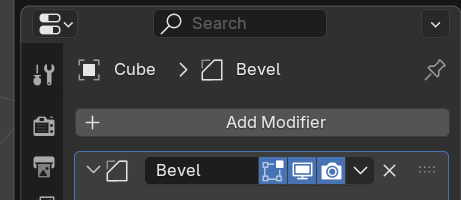
- 보여주는 모드 제어
- Edit 버튼: 에디트 모드에서만 변형 후 모습을 보이게/안보이게 할 수 있음
- Realtime 버튼: 변형 후 모습을 보이게/안보이게 할 수 있음
- Render 버튼: 렌더링 결과에서 변형 후 모습을 보이게/안보이게 할 수 있음
- Apply 버튼: 실제로 적용하여 객체를 변형시킴